Apoorva Bitton

SAP CONCUR INVOICE - TAX


Overview

This project focused on redesigning the tax experience within SAP Concur Invoice, a leading SaaS solution for accounting automation. The primary goal was to enhance efficiency, automation, and accessibility when adding taxes to invoices, particularly in countries with multiple tax types, such as Canada. The design solutions developed in this project are intended to be scalable and applicable to other countries with similar tax requirements, using Canada as a primary example.


My Role

My Role: UX Designer, User Researcher
Team: Product Manager, Engineering Manager, 2 Engineers, Implementation Manager
Tools: Figma, UserTesting, Microsoft Teams
Research Methods: Competitive and Comparative Analysis, Unmoderated Usability Study
Timeline: 2 months
Year: 2023


The Problem

SAP Concur Invoice is highly configurable, and clients often enable numerous custom fields, leading to overcrowded forms and endless scrolling. This cluttered interface negatively impacts efficiency and overwhelms users with the number of inputs required to complete their tasks.


The Solution

A scalable and accessible design that only displays relevant tax fields based on the shipping location. This approach saves UI real estate, automates tax calculations, reduces cognitive load, and increases user efficiency.


KPIs


♿ Accessibility
Meeting AA WCAG standards with a goal of achieving AAA compliance.

💨 Efficiency
A focused workflow to help users complete tasks faster.


😌 User Satisfaction
Enhanced overall user experience.

💻 Automation
Automatic tax calculation to ease cognitive load.
 

 DISCOVER & DEFINE


What is Tax/Canadian Tax?

SAP Concur offers a comprehensive solution that allows users to configure the product according to their business requirements. In Canada, invoices can have two tax types based on the province and the type of goods or services received. For cross-provincial invoices, companies may also be billed using four tax types.

For each tax type, there are 3 fields offered in the Invoice Details and Itemizations Sections. The 3 fields include - Tax Amount, Tax Code and Tax Rate. 

  • In-province invoice = 2 tax types x 3 fields = 6 fields on the UI

  • Cross-provincial invoice = 4 tax types x 3 fields = 12 fields on the UI

For tax breakdown by province, click here.


Invoice Legacy UI screenshot with the Tax fields highlighted. This particular configurations only shows 2 fields per tax.


Market Research: Competitive and Comparative Analysis

I conducted a competitive and comparative analysis to better understand where our product stands compared to our competitors and areas we can improve in. Based on my research, Concur provides a hyper-flexible and granular tax solution compare to its competitors so we need a unique solution to the problem. I explored more consumer-facing products like Shopify to see their tax flow and draw inspiration. I noticed that consumer-facing products had a more focused tax flow, it’s not a direct comparison to Concur but by making tax into its own workflow, it made the task more digestible and less tedious.


Top Left: Shopify, Top Right: Avalara, Bottom Left: Zoho Invoice, Bottom Middle: Bill.com, Bottom Right: Coupa


Persona

Persona of an Accounts Payable user.

For this project, we utilized the existing persona for an Accounts Payable user because adding tax(es) to an Invoice is part of their daily job responsibility.


Use Cases

Context: An Accounts Payable user needs to edit tax in 2 sections of the Invoice - Invoice Details and Itemizations. Invoice Details determine the tax fields in the Itemizations and Itemizations allow the user to granularity edit tax per line.


Walkthrough of Canadian Tax in the legacy (current) experience


Use Case 1
In-province invoices typically have 2 tax types on the UI leading to 6 fields in Invoice Details and 6 fields in Itemizations which is 12 fields on the UI. 

Use Case 2
Cross-province invoices can have 4 tax types on the UI leading to 12 fields in Invoice Details and 12 fields in Itemizations which is 24 fields on the UI. 


Side Note: The project only addresses the in-province use case and it is meant to be scaled so it will work for cross-province invoices as well


User Scenario

An Accounts Payable user from Vancouver, BC receives an invoice for office furniture. They have purchased and received the new office furniture. They are creating an invoice manually and need to add its associated details, including itemizing tax and submit it so the vendor can get paid.


 Exploration & Design Solution


Ideation

Exploration looking at different ways to display tax fields in the Itemizations section.


North Star
Removing the cognitive load by adding tax based on shipping location. Increasing efficiency by providing auto-calculation.

1. “Ship To” prompts tax fields to appear.
2. User can manually add tax in Invoice Details if needed.
3. Toggle Tax in Itemizations.
4. Tax Modal in Itemizations (auto-calculation).

MVP
Due to project scope and business decisions, I had to scale back the design and create an MVP until we can reach the North Star.

5. User manually adds tax in Invoice Details.
6. Toggle Tax in Itemizations.
7. Tax Modal in Itemizations (manual tax calculation).

 Prototype & Test


Prototype

Walkthrough of the MVP Canadian Tax prototype.


Unmoderated Usability Study: Hypothesis & Key Insights

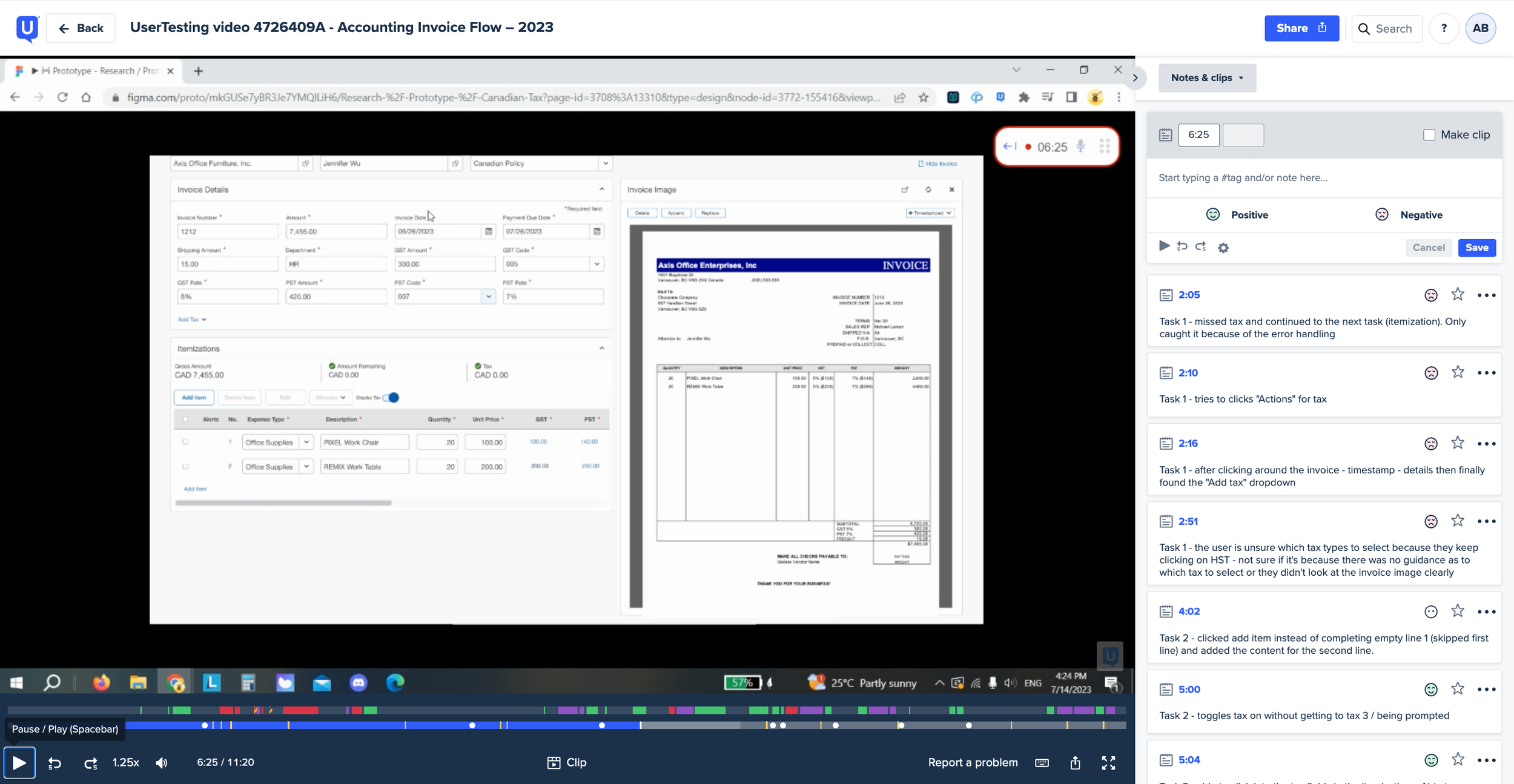
I conducted an unmoderated study with 7 participants with the goal to learn about the discoverability of “Add Tax” in Invoice Details and toggling the tax on/off in Itemizations, the ease of use of Edit Tax Modal and the overall likeability of the experience

 
Screenshot of a video where a participant is going through the unmoderated Canadian tax study in the UserTesting software

Screenshot from the Unmoderated Canadian Tax Study in the UserTesting software.


INVOICE DETAILS

Hypothesis: The “Add Tax” dropdown in the Invoice Details will be missed by the users.

Findings: Discoverability / Lack of Guidance & Increased Cognitive Load


Discoverability / Lack of Guidance
Better guidance is needed for the user to know that they need to add tax as it can be easily missed. The placement of the button itself is good.

Increased Cognitive Load
Asking the user to add the tax on the UI forces the user to have to read the invoice and they can easily miss which tax type to add on the Invoice. Need automation to provide a “suggested” tax field on the UI.


ITEMIZATIONS TAX TOGGLE

Hypothesis: Users can discover the tax toggle easily in Itemizations.

Findings: Learning Curve & Considerations


Learning Curve
There is a small learnability curve associated with toggling the tax on for the users that don’t itemize tax on average. Once discovered, the users were able to complete the task easily.

Consideration
The user enables the tax and then adds the line. Since this was a prototype the calculations were done for them. How do we guide the user to complete all lines before they enable tax so we do the math for them.


ITEMIZATION TAX MODAL

Hypothesis: Users will edit both taxes for each line with one click into the Tax Edit modal.

Findings: Performed as expected - no complaints


Final Outcomes


Final Design & Decision

We decided to move forward with the MVP as it would be a short-term solution since the end goal is to build the North Star, which includes the "ship to" functionality where the location drives the tax fields on the UI.

For the MVP version, the system will run an audit rule to validate if the user has entered tax fields before accessing the Itemizations section to prevent the user from leaving the Tax fields undiscovered and incomplete.


North Star: Ship To Location

Temporary Enhancement: Audit Rule

 Future Opportunities


Live auto-calculation for the Tax amount and rate (if the user edits the amount, the rate is automatically calculated and vice versa).