Apoorva Bitton

 SAP CONCUR INVOICE - ALLOCATIONs

 
Cover photo for Allocations project. Image of a laptop with Concur Invoice open.


Overview

This project involved redesigning and enhancing the usability, accessibility, and efficiency of the Allocations feature within SAP Concur Invoice, a leading SaaS solution for accounting automation. The Allocations feature enables users to efficiently distribute invoices to various cost centers, streamlining financial processes for large to enterprise users.


My Role

My Role: Lead UX Designer, User Researcher
Team: Product Manager, Engineering Manager, 2 Engineers, Implementation Manager
Tools: Figma, Microsoft Teams, Zoom, PowerPoint
Research Methods: User Interviews, Usability Study, A/B Testing
Timeline: 6 months
Year: 2023


The Problem


The legacy Allocations feature in SAP Concur Invoice had several issues:

  • Usability: The workflow had discoverability and usability problems, leading to an inefficient process.

  • Accessibility: The interface was not accessible to all users, particularly those using assistive technologies.

  • User Interface: The UI was outdated and inconsistent with other Concur products. These issues contributed to a low Product Satisfaction Score (PSAT) and led users to choose alternative invoicing products.


Legacy Design


The Solution

Leveraging SAP Concur's NextGen (NUI) experience to address the key issues:

  • Efficiency: Streamlined the user experience to reduce attrition rates and improve overall user satisfaction.

  • Inclusivity: Designed with a human-centred and data-driven approach, the solution prioritized accessibility and usability.

  • Consistency: Ensured design consistency across the SAP’s product suite, while incorporating intuitive and visually appealing elements.


Final Design


KPIs


💨 Efficiency
Reduce the number of clicks and streamline the process.

♿ Accessibility
Achieve AA WCAG standards with an aim for AAA WCAG compliance.


DISCOVER & DEFINE


What is Allocations?

A feature that enables users to distribute items from an invoice across different cost centers or departments.

For example, Anita receives an invoice for 10 pencils and 10 erasers. She needs to split the pencils between HR and Marketing using the Allocations feature.

Please see the demo of the legacy experience below:

Walkthrough of the Allocation workflow in the legacy Concur Invoice experience.


Research: User Interviews

In collaboration with the Product Manager, we conducted user interviews targeting the Accounts Payable persona, which represents the primary users of this feature. This feature directly impacts our enterprise users, who account for approximately 10% of our 24 million global users.

The main goals of Accounts Payable users are to complete invoices as efficiently and accurately as possible.

Based on feedback from these interviews, we identified several key insights and opportunities.


Key Insights 

  • Users are generally satisfied with the allocation flow.

  • Preferences vary: some users prefer bulk allocation, while others prefer allocating line by line.

  • There are discoverability issues with allocation and bulk edit tools.

  • Users desire fewer clicks for a more efficient process.

Opportunities 

  • Reduce Clicks: Streamline the workflow to minimize the number of clicks.

  • Enhance Flexibility: Provide options that cater to both bulk allocation users and those who prefer one-at-a-time allocation.

  • Improve Discoverability: Enhance the information architecture and address usability issues to make key features more accessible


Exploration & Design Solution


Legacy Invoice

  1. Allocation Summary: Hard to read causing high cognitive load due to poor padding and inaccessible to keyboard and screen reader users.

  2. Edit (Bulk Edit): Increased number of clicks to add/edit itemization and discoverability issues when bulk editing itemizations.

  3. Distribute (Allocations): Increased number of clicks to allocate itemizations.


Ideation

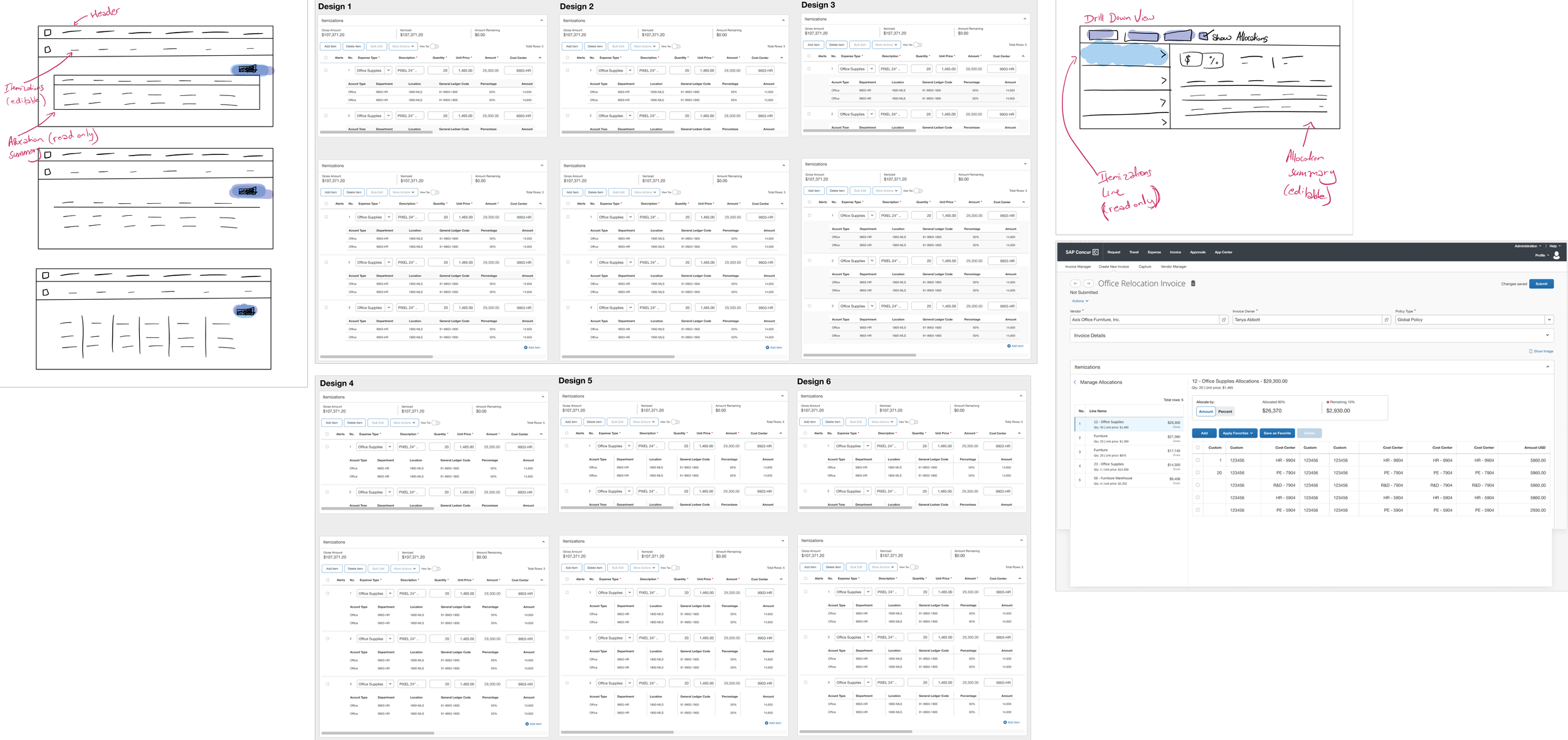
First Image: Low to high-fidelity ideations for Allocations.

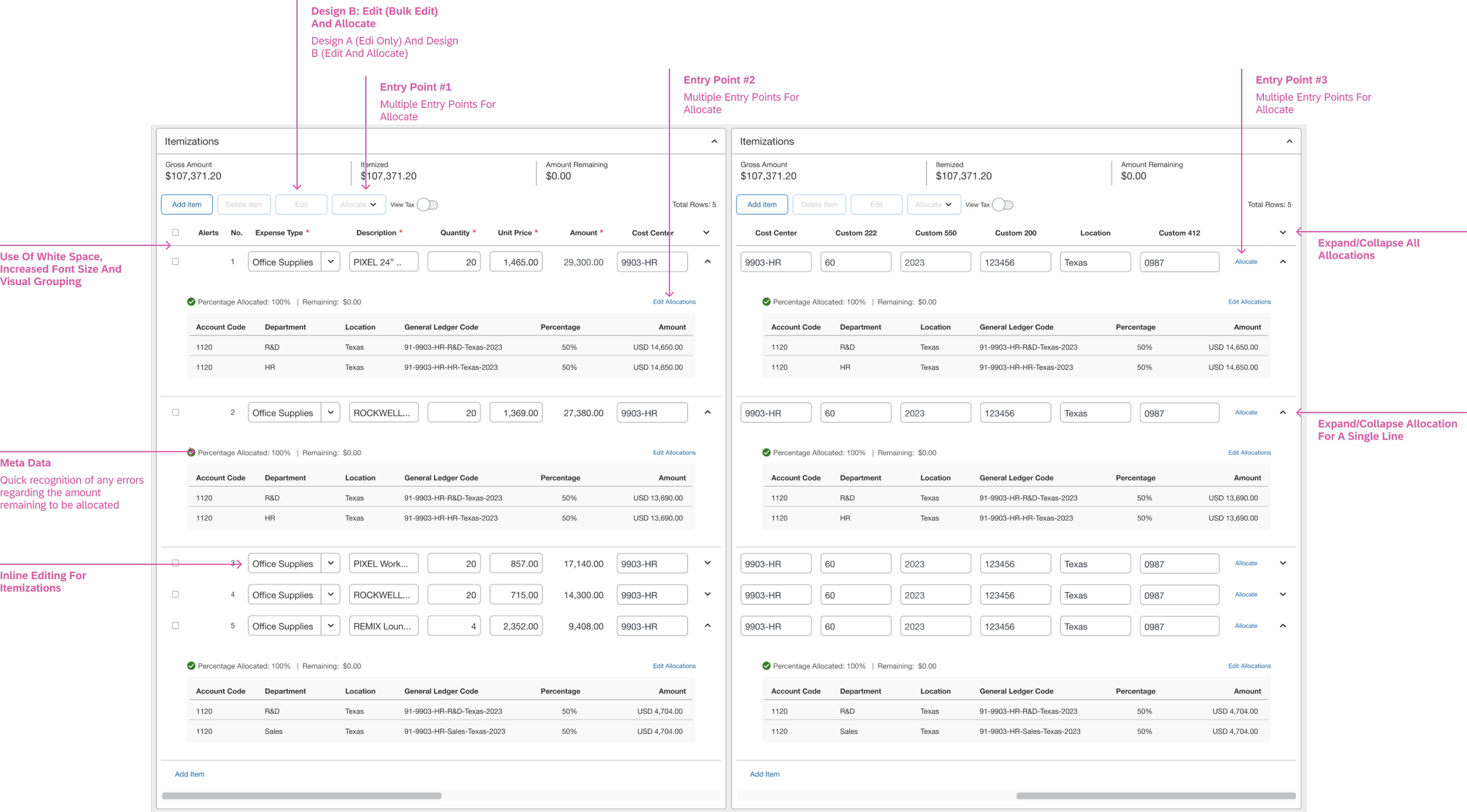
Second Image: Proposed solution for Allocations. This shows the nested data grid in Prototype B.


 PROTOTYPE & TEST


Prototypes

Prototype A: One Button - “Edit” Only
Combined flow for allocate and bulk editing itemizations. The video below goes through the following:

  1. Allocate single itemization.

  2. Bulk allocate 2 itemizations.

  3. Bulk edit Expense Type for all the itemizations.

Prototype A consolidates both bulk edit Itemization fields and allocations into one modal/workflow.

Prototype B: Two Buttons - “Edit” and “Allocate”
Separate workflows for allocate and bulk editing. The video below goes through the following:

  1. Allocate single itemization.

  2. Bulk allocate 2 itemizations.

  3. Bulk edit Expense Type for all the itemizations.

Prototype B keeps bulk edit Itemization fields and allocations in separate modals/workflow.


A/B Usability Study (Key Insight)

I tested both prototypes with 12 participants at SAP Concur Fusion 2023.

Key Insights:

  • Prototype B performed better, with users preferring separate buttons for allocations and bulk editing.

  • Users responded positively to 2 entry points for allocation – button bar and In Line.

  • Users reacted positively to the allocation summary view (nested data grid).

  • Users appreciated the NextGen experience's improved padding, visual hierarchy, and information grouping.

Opportunity Areas:

  • Grouping Issue - It's not clear how allocations are related when only one line is expanded.

  • Discoverability Issue - Users were unable to discover the expand/collapse allocations affordance and requested it to be more explicit.

  • Outdated User Interface - Users expressed a strong desire for a modernized interface to enhance the overall user experience.


 REDEFINE


Accessibility Reviews and pivot

I discovered our nested data grid design was inaccessible to assistive technologies after the usability studies, despite prior A11y compliance reviews.

Nested Data Grids aren't supported on the web, causing screen readers to read the entire allocations summary as a single string.

Multi-Level Header Data Grid allows assistive technologies to navigate the grid and provide proper context for each cell's information.


 FINAL OUTCOMES


Final Outcomes & Impact

The final solution involves a Multi-Level-Header iteration and a revamped UI utilizing the SAP Fiori theme.

Multiple Entry Points

(1,2) Multiple Entry Points: Offering users multiple entry points for allocations reduces the number of clicks required and enhances overall process efficiency.

Discoverability (Allocations Show/Hide Button) and Multi-Level Header Data Grid

(3) Discoverability (Allocations Show/Hide Button): The toggle button improves discoverability, allowing users to easily show/hide the Allocations Summary.

(4) Multi-Level Header Data Grid: The multi-level header data grid improves accessibility and ensures a clear connection between allocation and the itemization it belongs to.


Key Metrics

♿ Accessibility Issues: 0
All accessibility issues are resolved, allowing SAP to grow in additional markets.

💨 Reduced Number of Clicks: 2-4
Reduced the number of click from 7 to 2-4 depending on the path user takes to add itemizations and allocate.

👀 Improved Discoverability: 100%
Users interacting with Prototype B were able to discover Bulk Edit easily.

 FUTURE OPPORTUNITIES


⚙️ Allocations Grouping
Group itemizations by allocations for quicker review.

🤖 AI-Assisted Invoice Completion
Use AI to automate tasks and provide intelligent suggestions.

🤖 Machine Learning for Allocation Patterns
Automate the allocation process based on detected patterns.